
Converting a Legacy App to Mobile

Project Overview
Summary
Service Tech was a 20-year-old web application that field service technicians were expected to use on job sites on mobile devices it was never designed for. Viewpoint needed it rebuilt as a modern mobile app that technicians could actually use in the field, independently, without calling back to the office.
I led end-to-end UX design for the redesign from interviewing field technicians and learning the original system to defining information architecture, navigation, and all core workflows. I also mentored a junior designer based in India through the later stages of the project. The result revitalized a legacy product, integrated it into Viewpoint’s broader mobile suite, and opened new revenue opportunities for the platform.
Problem to Solve
Service Tech had been built for desktop use over 20 years earlier. Field technicians were expected to manage work orders, track time, handle invoicing, upload documentation, and manage equipment history all from a web application on a mobile device it was never designed for.
The core problems were clear: technicians couldn’t complete jobs independently in the field without significant friction, the information architecture didn’t reflect how technicians actually worked across multiple jobs per day, and the desktop-first layout made even basic tasks cumbersome on a phone or tablet.
Viewpoint needed a ground-up mobile redesign that matched real technician workflows not a port of the existing web app.
Process
Discovery
I started by learning the original Service Tech application in depth, working directly with the product owner and the engineer who originally built it to understand its full functionality and technical constraints.
From there I conducted field research and interviews with service technicians to understand how they actually worked on job sites — what they needed to access quickly, where the existing system failed them, and what was missing entirely. The key insight was that technicians move between multiple jobs in a single day and need to keep job-specific actions clearly separated from global app functions. Confusing the two caused errors.
Information Architecture & Navigation
The central design challenge was how to organize Work Orders and what each Work Order should contain balancing completeness with usability in a mobile context where screen space and attention are limited.
The solution was a two-tier navigation system. Global navigation company, user profile, work order types, account settings, and time cards lived in a persistent hamburger menu accessible from anywhere in the app. Everything specific to an individual job was contained within that job’s Work Order, accessible through a tile-based layout that made it clear users were acting on a specific job, not the entire system.
This separation was deliberate technicians completing multiple jobs per day needed a clear boundary between global actions and job-specific ones to avoid errors.

Design
With the information architecture established I designed all core workflows work order management, time tracking, labor assignment, invoicing, photo and document uploads, and equipment history.
I mentored a junior designer based in India through the later stages of the project guiding them on information presentation, visual design, and how to think through interaction decisions before handing off the remaining screens.

Client
Viewpoint
Services
- Information Architecture
- User Experience Design
- User Interface Design
Tools
- Sketch
- InVision
Design Elements
Outcomes
The redesign delivered a fully functional mobile app covering all core field service workflows work order management, time tracking, labor assignment, invoicing, photo and document uploads, and equipment history.
Business Impact
Revitalizing a 20-year-old application is a different design challenge than building something new. The original Service Tech had accumulated years of workflow assumptions that no longer matched how technicians worked in the field. The redesign cleared that debt by starting from real user feedback and rethinking the information architecture from the ground up.
The tile-based work order navigation solved a specific safety problem: keeping job-level actions scoped to individual work orders prevented technicians from making changes to the wrong job, which had been a real risk in the original system. This kind of error prevention is difficult to retrofit into a legacy product but is straightforward to design in from the start.
By bringing Service Tech into Viewpoint’s mobile ecosystem, the product became viable for a wider range of field teams and field conditions. It also created a foundation for future feature expansion, including additional mobile workflows that the original web application could not support.
Designs
Open Assignments Landing Page
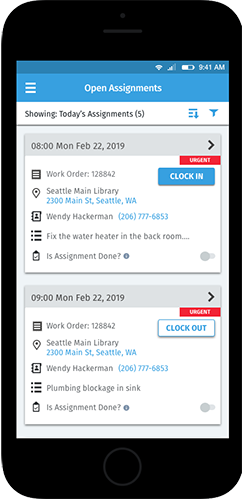
When a technician logs in they see a prioritized list of today’s jobs each with a Google Maps link, client contact info, a job summary, and the ability to clock in, clock out, and mark an assignment complete. Everything needed to start a job is on one screen.
Job Details
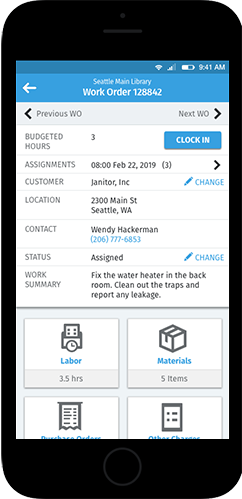
The job detail view shows clock in/out controls, job status, and the number of assignments attached to the job. Tile-based navigation options are job-specific they are not accessible from the global hamburger menu, ensuring technicians always know which job they’re acting on.
Labor
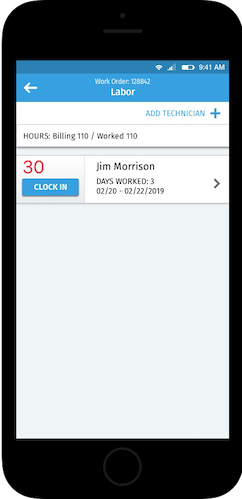
Technicians can review hours worked on a project, clock in and out, and assign additional technicians when a job requires more hands.
Add Technicians
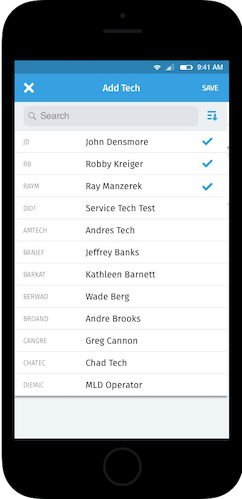
When a job requires additional help, technicians can pull up a filterable list of available techs and add them directly from the field — no office coordination required.
Docs & Images
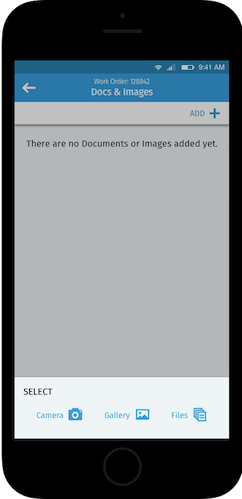
Technicians can capture photos directly in the app, upload from their camera roll, or attach documents keeping all job documentation in one place without leaving the workflow.
Equipment
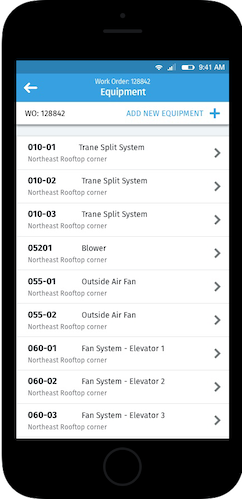
Each job maintains an equipment list that builds over time. Technicians can view the full service history of any piece of equipment or add new equipment directly from this screen.