
AI-Driven UX Project

Project Overview
Summary
Home service lead generation is deceptively complex. A roofing inquiry requires completely different questions than an HVAC repair or a plumbing emergency. A one-size-fits-all intake form loses leads, but building 40+ custom flows manually is time-consuming and expensive.
The goal was to design a scalable, dynamic intake system that adapts to the service type being requested, asking only the relevant questions at each step while still capturing contact information to generate qualified leads.
A hub-and-spoke architecture fit this problem well: a central intake framework as the hub, with service-specific flows branching as spokes, letting the system scale across dozens of service types without duplicating steps or fragmenting into 40+ disconnected forms.
Problem to Solve
Building 40+ custom intake flows manually, one per service type, is time-consuming and expensive, and a one-size-fits-all form loses leads by asking irrelevant questions. The system needed to feel tailored to each service without actually requiring a from-scratch build for each one.
This required balancing:
- scalability across dozens of service types
- specificity for each service
- consistency in user experience and data capture
Visual Artifacts
My Approach
Before involving AI, I began with pencil sketches to define the strategic architecture of the system. The hub-and-spoke model became the approach: a central intake framework as the hub, with service-specific flows branching as spokes. This framework ensured consistent core steps while accommodating all 40+ services without redundancy.
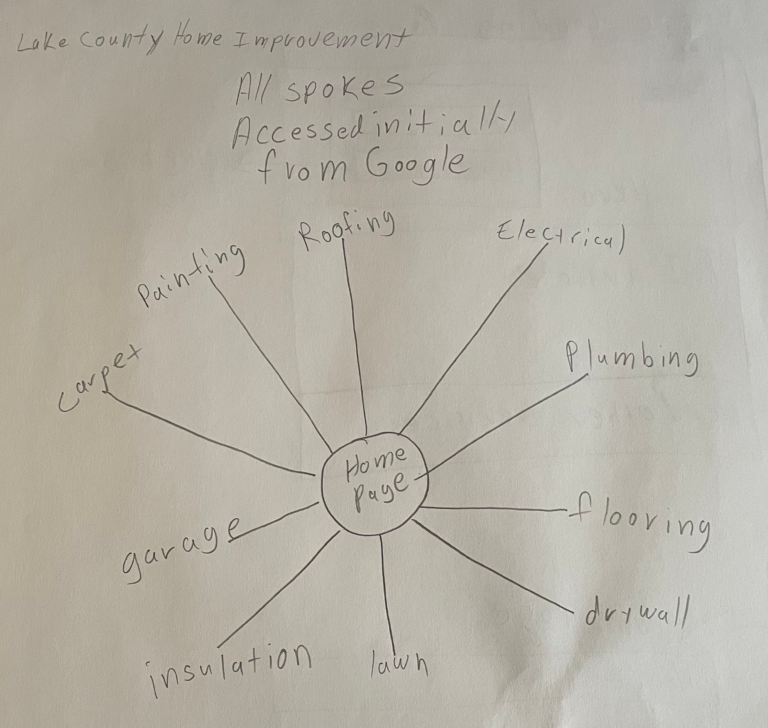
Pencil Sketch: Hub & Spoke Architecture
Strategic sketch showing the hub-and-spoke model.
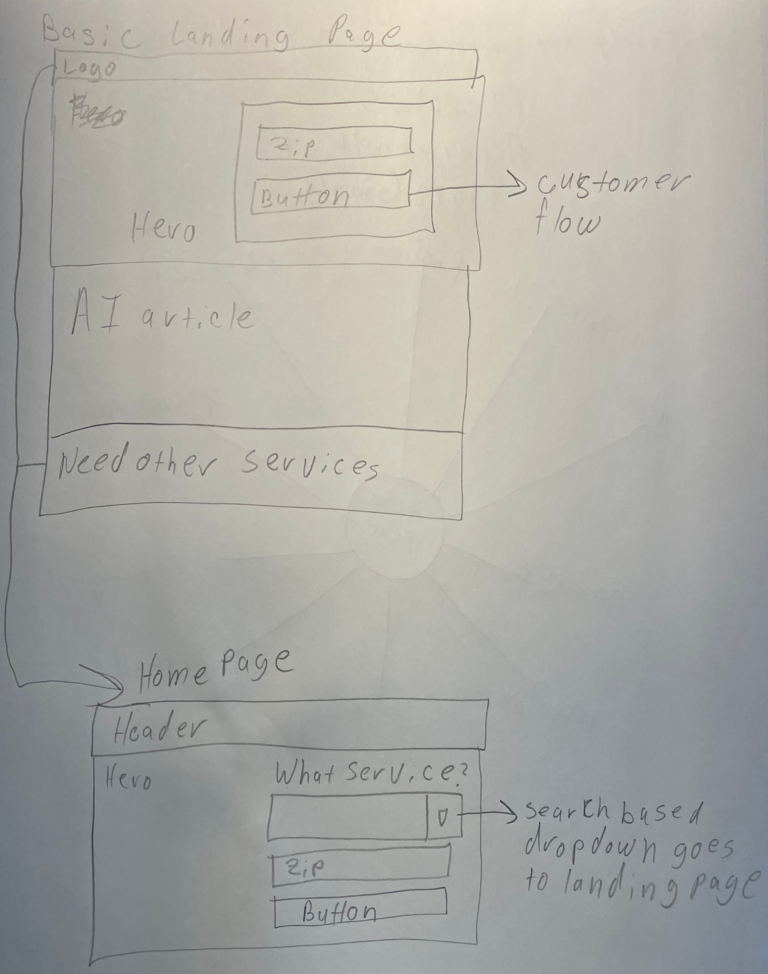
Pencil Sketch: Early Flow Concept
Baseline flow concept showing the sequence and branching logic. These sketches defined constraints for Claude, ensuring generated flows were consistent and usable.
Starting with sketches was intentional: strategy originates from experience; AI accelerates execution.
AI Integration
With architecture established, I used Claude to analyze competitor websites to extract:
- How intake flows were structured
- The questions asked per service type
- Where users dropped off
I then directed Claude to generate:
Information Architecture – A structured hub-and-spoke system organizing 40+ service types, decision points, and user paths into a scalable model.
User Flows – Step-by-step pathways ensuring only relevant questions appear per service type.
Journey Maps – End-to-end visualizations highlighting touchpoints, decision points, and friction points.
Dependency-Driven Form Flows – Conditional logic demonstrating how intake questions adapt based on the job type.
Clickable Prototype – A fully interactive demo implementing the hub-and-spoke architecture, from service selection through contact capture.
All AI outputs were refined under my direction. My experience ensured the final flows were correct, efficient, and aligned with long-term scalability goals, not just generated outputs.
What This Demonstrates
This project shows how I use AI as a practical tool, not a replacement for UX thinking. Strategic decisions, architecture, flow structure, and system constraints, were all mine. AI handled execution, dramatically accelerating the prototyping phase while respecting the structural integrity I defined.
What’s Next?
Visual design, usability testing, and iteration based on real user feedback. The AI-generated flows and prototype form a structured foundation for the upcoming design and validation phase.
Designs: UX Work
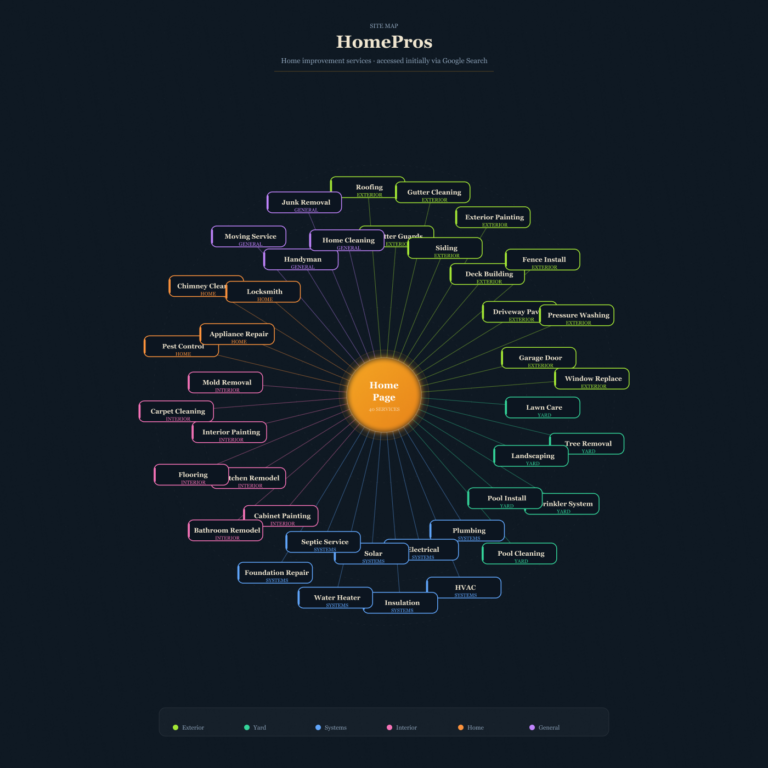
Claude: Hub & Spoke
The hub-and-spoke model places a central intake framework at the center, with service-specific flows branching out, scaling across all services without duplicating steps.
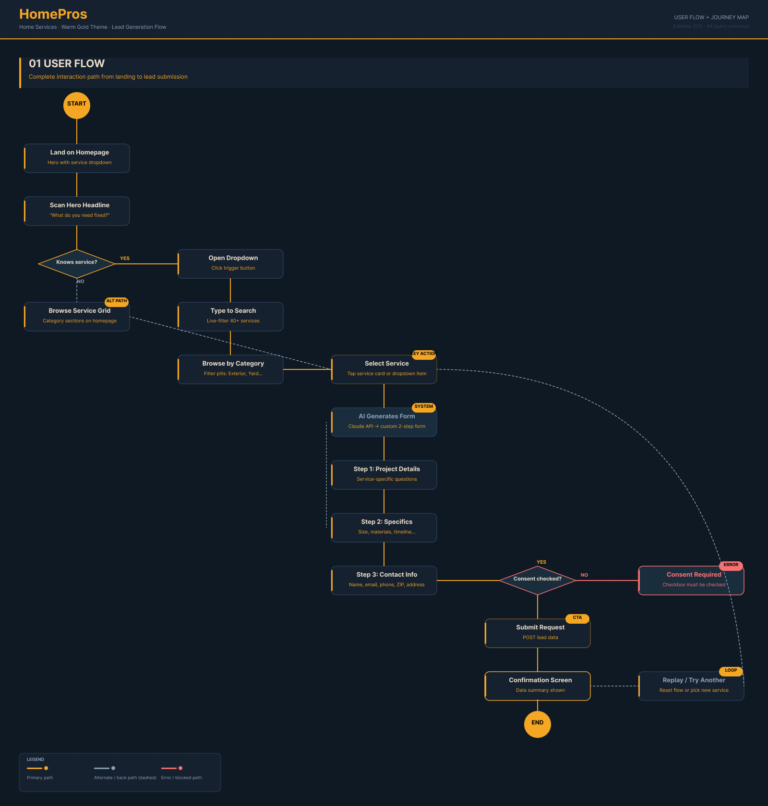
Claude: User Flows
Step-by-step pathways for each service type generated by Claude from competitor analysis. Each flow ensures only relevant questions appear at the right stage of the intake process.
AI-generated flows reviewed and refined to maintain consistency, reduce redundancy, and ensure all variations align with the hub-and-spoke model.
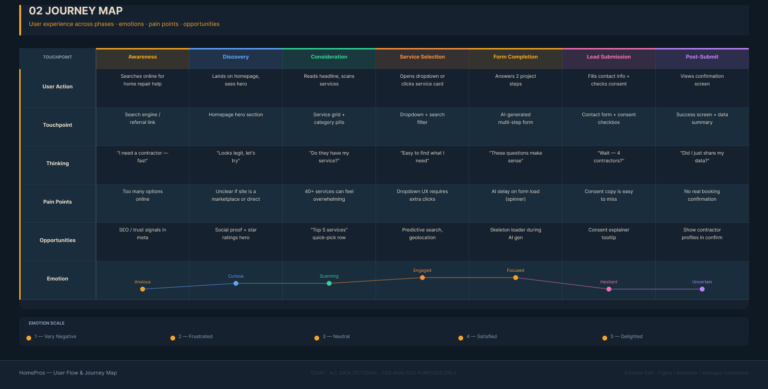
Claude: Journey Maps
End-to-end journey maps highlighting key touchpoints and decision points.
Shows user experience across services, with my refinements ensuring all touchpoints align with the scalable system model.
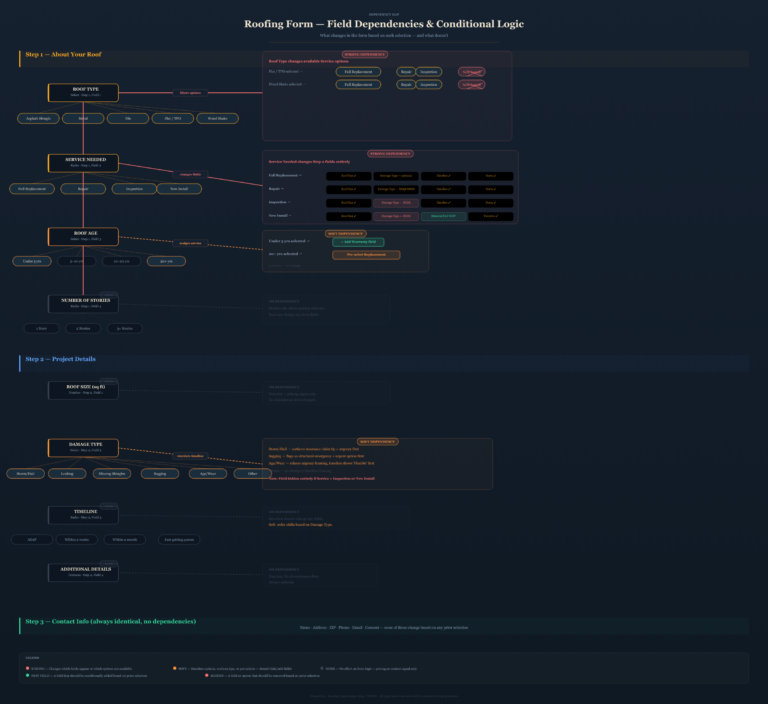
Claude: Dependency-Driven Form Flows
Conditional logic maps showing adaptive question sequences per job type.
Refined to ensure each user only sees relevant questions, fully consistent with hub-and-spoke structure.
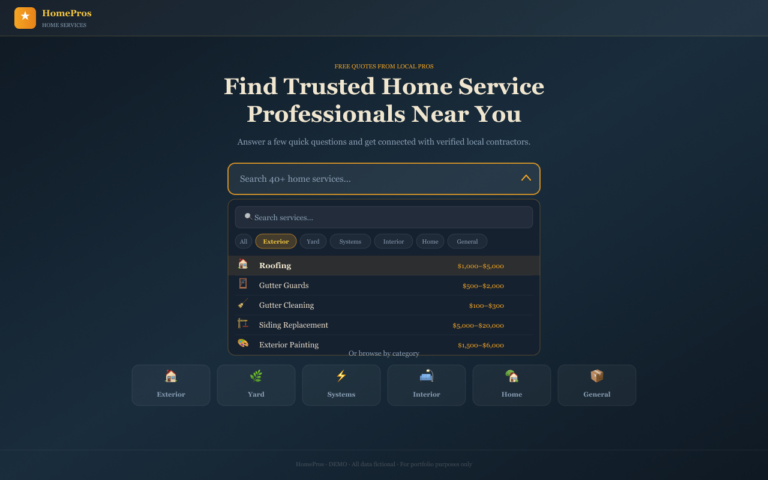
Claude: Prototype: Homepage
Dropdown search bar and 40+ service buttons allow both search-driven and browse-driven entry into flows.
Clickable prototype showing correct entry point for hub-and-spoke intake system.
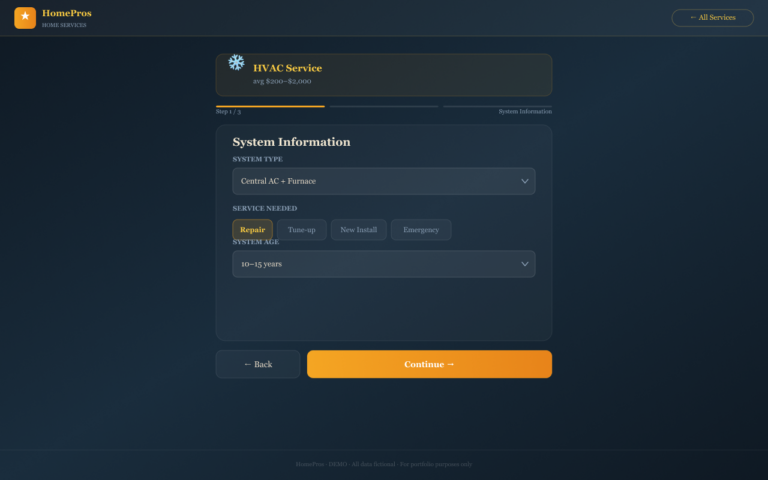
Claude: Prototype: Select Service Details
Users select the specific type of work needed, guided by dependency logic.
Interactive step demonstrating conditional flow decisions based on my initial architecture.
Branding & Early Visual Designs
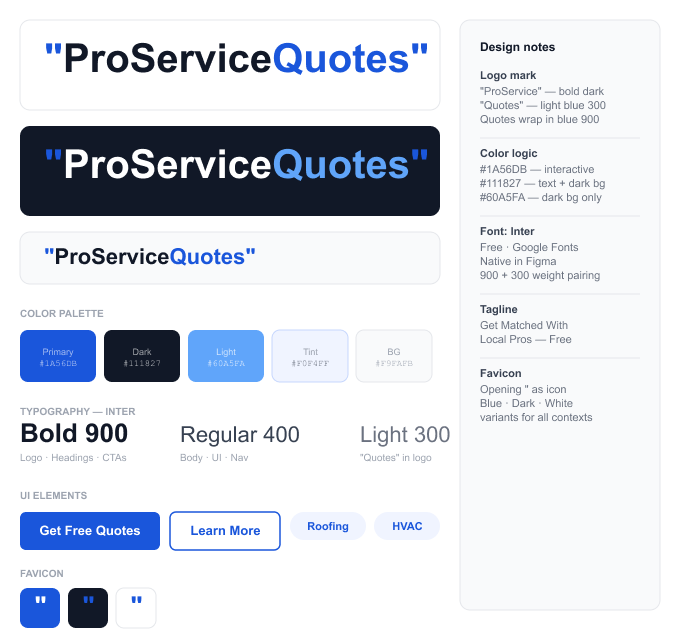
Claude: Branding
After architecture, Claude helped refine visual direction. Logo variants, color palette, and typography tokens were produced under my guidance.
Branding system SVG showing consistent visual foundation for all future designs.
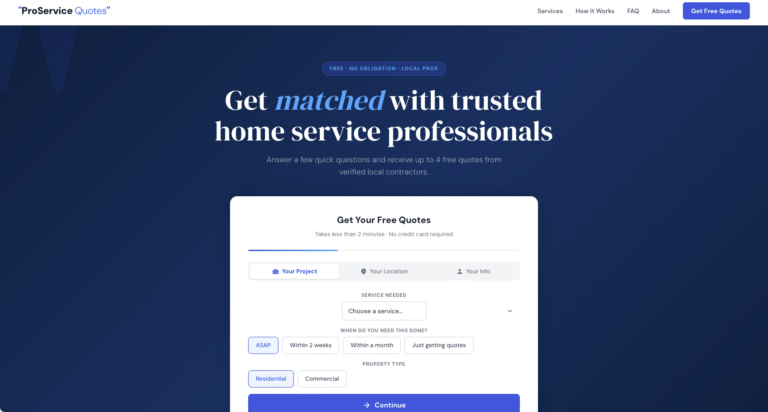
Claude: Round 2 Prototype
Full HTML landing page applying the brand system end-to-end: hero with 3-step intake form, filterable service grid, stats bar, how-it-works section, FAQ, and footer.
Demonstrates application of brand and flow integration. All structural decisions were defined and validated by me.
Using Stitch as a Design Tool
Before this project, I hadn’t designed a marketing website in six years, my recent work had been entirely web-based SaaS applications and touchscreen device interfaces. Application design and lead-generation website design follow different rules: different conversion goals, different visual conventions, different ways users scan and decide. With the Claude foundation in place, I used Stitch for high-fidelity visual design, and the process helped me re-orient to web design specifically after years focused elsewhere. These are directional explorations, not final designs.
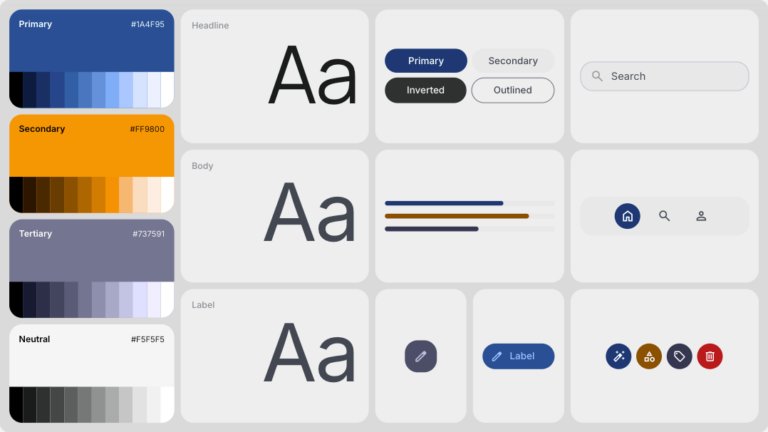
Stitch: Branding
Step 3 iteration generating a full design system in Stitch from Claude outputs: colors, typography, buttons, dividers, icons, and component tokens.
Refined system design extending the Claude brand foundation, fully aligned with structural decisions.
Stitch: Designs
I explored two distinct directions in Stitch, using the Claude assets as a starting point for each. Rather than choosing one outright, the final design will pull the strongest elements from both versions.
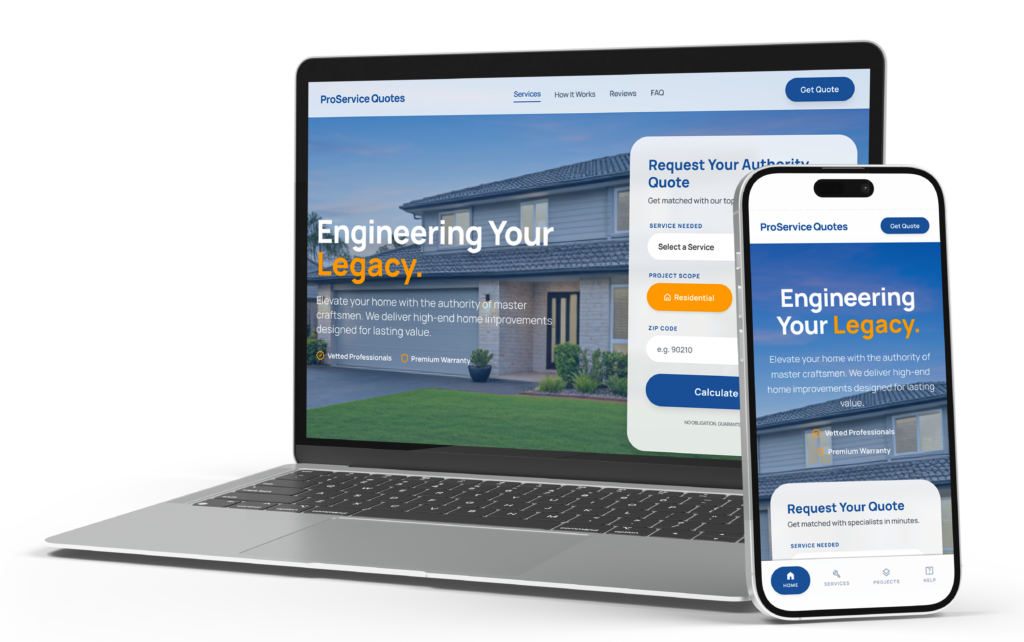
Stitch: Round 1
Desktop hero iteration: tightened estimate form layout and refined category filter spacing.
View Stitch File
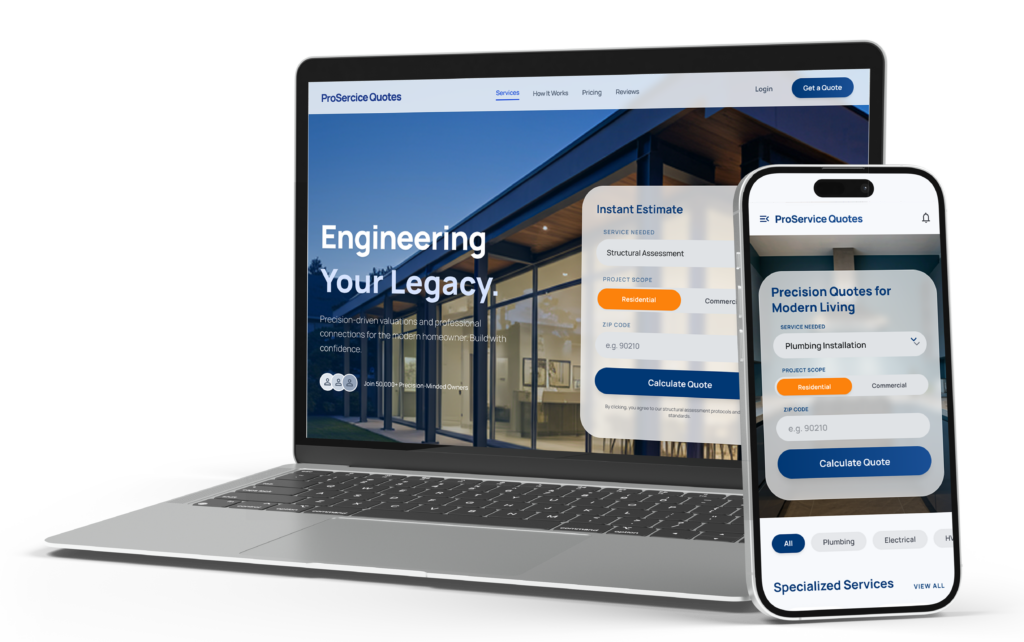
Stitch: Round 2
Full desktop service grid iteration: demonstrates scaling across 40+ service types with signature service lines and stats block.
Client
Content Codes
Services
- Information Architecture
- Wireframes
- User Experience Design
- User Interface Design
Tools
- Claude
- Figma